

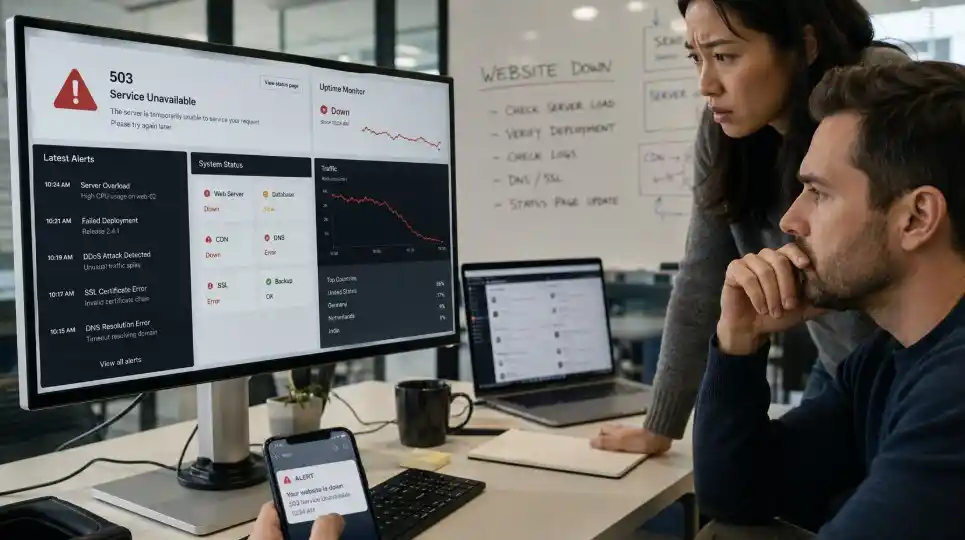
The most common causes of website downtime include server overload, hosting issues, failed updates, cyberattacks, DNS errors, hardware failure, SSL problems, and human error. Regular website maintenance helps reduce these risks through updates, monitoring, backups, security checks, and recovery support.
Website downtime matters because every unavailable page can cost leads, sales, trust, and search visibility. Understanding what are common reasons for website downtime helps businesses protect forms, landing pages, checkout pages, booking tools, and key pages when customers are ready to act.
Key Takeaways About Website Downtime
- Server overload happens when traffic exceeds hosting limits.
- Failed updates can break plugins, themes, forms, or payment tools.
- Cyberattacks can slow down, infect, or take a website offline.
- DNS, SSL, and domain issues can make a working site unreachable.
- Backups, monitoring, and maintenance help reduce downtime and speed up recovery.
What Is Website Downtime?
Website downtime is any period when visitors cannot access your website or complete an important action, such as submitting a form, booking a service, or completing a payment.
Downtime can be full or partial. A full outage takes the site offline, while partial downtime may only affect forms, carts, logins, or payment tools. Common signs include 500, 502, 503, or 504 errors, slow pages, broken forms, SSL warnings, DNS errors, and blank pages after an update.
What Are the Common Reasons for Website Downtime?
The biggest causes are server overload, maintenance errors, hardware failure, cyberattacks, failed updates, DNS issues, SSL problems, domain errors, and human mistakes.
Uptime should be treated as a business priority because slow or unavailable websites can lead to revenue loss, missed inquiries, wasted ad spend, and lower brand trust.
1. Server Overload
Server overload happens when a website receives more traffic, requests, or background activity than the server can handle during a campaign, sale, viral post, SEO spike, or bot attack.
Reduce this risk with the right hosting plan, caching, compressed images, a content delivery network, pre-campaign hosting checks, and server response monitoring.
2. Maintenance Errors
Maintenance errors can happen during server updates, plugin updates, database changes, theme edits, or platform upgrades. Without testing or backups, even planned work can make a website unavailable.
Prevent this by scheduling work during low-traffic hours, backing up the site, testing updates on staging, checking key functions, and keeping maintenance windows short.
3. Hardware Failure
Hardware failure happens when a server, storage system, network component, or power system stops working. Cloud hosting lowers some risk, but websites can still fail when hosting lacks redundancy and fast recovery.
Before choosing a hosting, check uptime history, backup options, support response time, security tools, server scalability, and recovery process.
4. Cyberattacks
Cyberattacks can cause downtime through malware, brute force logins, malicious redirects, and DDoS attacks. Small business websites are often targeted because they may use outdated plugins, weak passwords, or unused admin accounts.
Security steps include strong passwords, two-factor login, limited admin access, malware scans, firewall protection, software updates, and suspicious login monitoring.
5. Failed Updates
Updates are necessary, but they can cause downtime when plugins, themes, PHP versions, or WordPress core files conflict. A website may still load while forms, payments, or booking tools stop working.
Prevent update issues by testing updates on staging, creating a backup, updating one major component at a time, checking key functions, and removing unused plugins.
6. DNS, SSL, and Domain Issues
DNS, SSL, and domain issues can make a website unreachable even when the server is working. These problems often happen during migrations, hosting changes, SSL renewals, or domain renewals.
Check domain expiration, DNS records, SSL status, nameserver settings, hosting renewal status, and redirect rules after migration.
7. Human Error
Human error includes deleting files, changing DNS records, disabling the wrong plugin, misconfiguring redirects, editing code incorrectly, or publishing unfinished changes. The bigger risk is having no backup, change log, restore process, or recovery owner.
Reduce human error with limited admin access, role-based permissions, documented changes, off-site backups, pre-publish testing, and no live code edits without a recovery plan.
How to Check Website Downtime Before Customers Notice
Start by confirming whether the issue affects everyone or only your browser, device, network, or location. A website may look offline because of cache, DNS propagation, firewall rules, or browser problems.
Open the website in another browser, test it on mobile data, use an uptime checker, check hosting alerts, review DNS and SSL status, check recent updates, and test forms, checkout pages, booking tools, and login areas.
If one page is broken, check plugins, redirects, scripts, or content blocks. If the whole site is offline, start with hosting, DNS, SSL, domain, and server-level errors.
What Is the Difference Between Planned and Unplanned Website Downtime?
Planned downtime is scheduled and controlled, while unplanned downtime happens without warning. Planned downtime usually comes from maintenance, migration, or server upgrades.
Unplanned downtime often comes from cyberattacks, overload, DNS errors, failed updates, broken functions, or slow pages. It usually causes more damage because the business has no time to prepare, notify users, or pause campaigns.
How to Prevent Website Downtime With Better Maintenance
Preventing downtime starts with reducing known risks before they become outages. A strong plan includes updates, backups, security checks, hosting reviews, performance monitoring, and careful testing.
For long-term prevention, update WordPress, remove unused tools, use staging, run malware scans, monitor uptime, store off-site backups, optimize speed, review hosting capacity, test key functions monthly, and document major changes.
For businesses planning a new website or redesign, website development services can create a stronger foundation for speed, mobile usability, security, browser compatibility, SEO, and post-launch support.
How to Reduce Website Downtime During an Outage
Reducing downtime during an outage starts with fast diagnosis and a clear recovery plan. The goal is to find the root cause, restore access, protect users, and stop the same issue from repeating.
Confirm the outage on more than one device, identify the source, contact hosting support if needed, disable the latest update if it caused the issue, restore a clean backup, scan for malware, test the site, and record the fix.
When Should You Get Website Support for Downtime Issues?
You should get website support when downtime repeats, updates break pages, forms stop working, or your site loads slowly during normal traffic. These signs show that your website needs more than a quick fix. If you are unsure what are common reasons for website downtime on your site, a support team can check hosting, updates, DNS, SSL, security, backups, and performance issues.
Get help if you notice 500, 502, 503, or 504 errors, malware warnings, expired SSL issues, lost traffic after technical changes, broken forms, or no clear backup and recovery process.
Keep Your Website Online, Fast, and Ready to Convert
Website downtime can happen because of hosting limits, failed updates, security threats, DNS errors, broken plugins, expired SSL certificates, or human mistakes. Knowing what are common reasons for website downtime helps you prevent these issues before they affect leads, sales, and customer trust.
Conclusion
DevOpt Web Development Services helps businesses build, maintain, repair, and optimize websites that support visibility, leads, and long-term growth. If your site keeps going offline, loads slowly, or breaks after updates, contact us, call +63 998 555 5108 or email devoptwebservices@gmail.com to get expert website maintenance, development, and SEO support.
Frequently Asked Question
Is website downtime always caused by poor hosting?
No, website downtime is not always caused by poor hosting because updates, DNS errors, cyberattacks, expired domains, broken plugins, and human error can also take a site offline. Check hosting, DNS, SSL, recent updates, security alerts, and server logs.
Does website downtime affect SEO?
Yes, website downtime can affect SEO when search engines repeatedly find errors or users keep leaving unavailable pages. Short planned downtime is usually manageable, but recurring outages can weaken crawl efficiency, reduce trust, and hurt user experience.
Can I check website downtime without technical skills?
Yes, you can check website downtime without technical skills by testing the site in another browser, using mobile data, and checking it with an uptime tool. Then check whether one page or the whole site is affected.
Is scheduled maintenance considered website downtime?
Yes, scheduled maintenance will still result in website downtime because visitors may not access the site or complete important actions. Planned downtime should happen during low-traffic hours with backups, proper status handling, and final testing.
Can website maintenance prevent common reasons for website downtime?
Yes, website maintenance can prevent many common causes by keeping software updated, monitoring uptime, managing backups, checking security, and testing key website functions. It cannot remove every risk, but it gives your business a stronger recovery plan.